PSiRA Online Booking 2026: Book, Reschedule & Check Appointment Status
PSiRA Online Booking allows security officers and new applicants to book a PSiRA appointment before visiting a regional office. After reviewing the official booking process and common applicant questions, I found that many people face confusion about selecting the correct service, choosing an available date, and preparing the required documents. This guide explains the complete appointment booking process, eligibility, required documents, and practical tips to help you book your PSiRA appointment successfully and avoid unnecessary delays.
What Is PSiRA Online Booking?
The PSiRA Online Booking system is an online appointment platform that requires clients to book a visit before going to any PSiRA branch in South Africa. Instead of accepting walk-in visits, the system allows users to schedule appointments for services such as registration, certificate renewal, and ID card collection.
Who Needs to Book a PSiRA Appointment?
| Applicant Type | Appointment Required? | Purpose |
|---|---|---|
| New Security Officer Registration | Yes | Submit a first-time registration application. |
| PSiRA Certificate Renewal | Yes | Renew an expired or expiring registration. |
| Fingerprint Capture | Yes | Complete biometric verification. |
| Certificate Collection | Yes | Collect your printed PSiRA certificate after approval. |
| Profile Claim or Online Account Assistance | Usually | Receive help with claiming or accessing your online profile. |
| Information Updates | In Most Cases | Update personal details or supporting documents. |
| Security Business Directors / Owners | Not Always | Some business-related matters can be arranged directly with the relevant PSiRA office instead of using the online booking system. |
PSiRA Online Booking First Time 2026
PSiRA online booking first time process is simple. Just follow the steps below that I have provided.
- Visit the official digital PSiRA website for appointment booking.
- Tap on “Login” at the top right corner.
- Enter “Username” and “Password.”
- Click on “Login.”
- Click on “Booking” from the list of services.
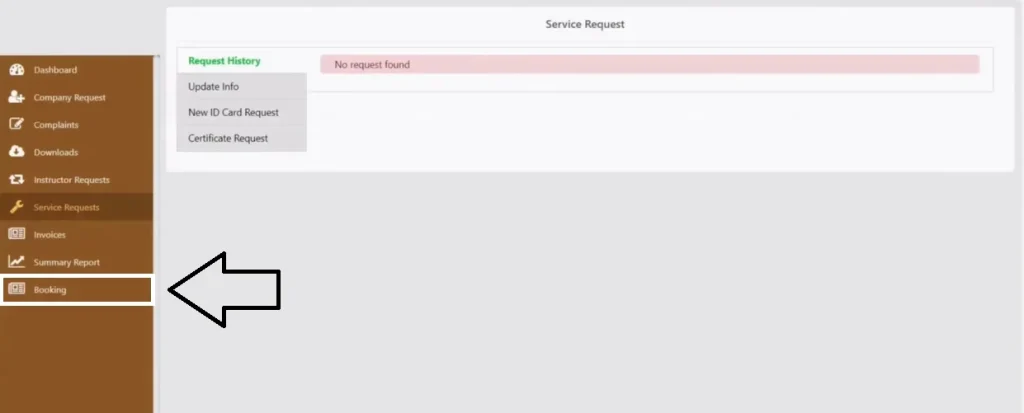
- Click on “New Booking.”
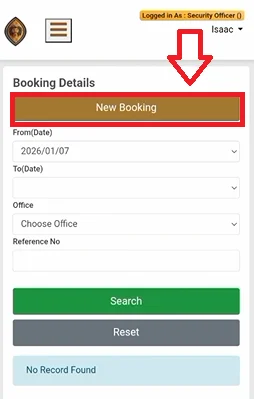
- Choose your preferred Service Type, Office, Booking Date, and Time Slot from the available options.
- After that, click on “Send OTP.”
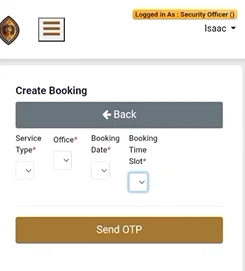
- When you receive an OTP on your registered mobile number, it means your PSiRA appointment booking has been successfully completed.
PSiRA Online Booking For Renewal
Follow the simple step-by-step guide below to complete your PSiRA online booking for renewal.
- Visit the official website: https://digitalservices.psira.co.za/
- Login to your account and click on “New ID Card Request” under the “Service Requests.”
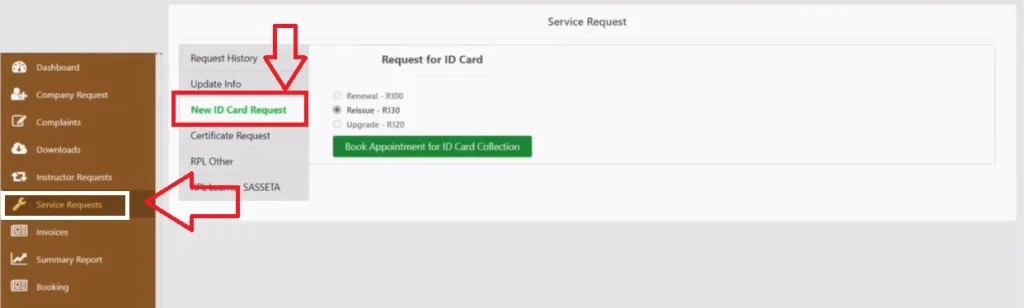
- Select “Renewal” and click on “Book Appointment for ID Card Collection.”
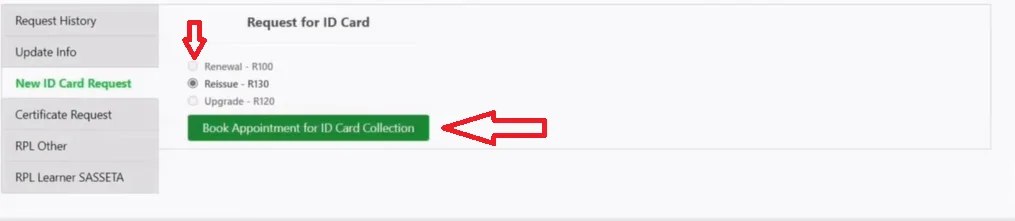
- Follow the screen prompt to book your PSiRA online renewal appointment
PSiRA Online Booking For Collection
- Go to the official “PSiRA” website and login to your account.
- Go to “Booking” section and click on “New Booking.”
- Click on “Service type” then select “Certificate Collection” or “ID Card Collection.”
- Fill the other detail and follow the instruction to book your appointment.
How to Cancel PSiRA Booking Online
According to the PSiRA, branch appointment bookings are generally final and cannot be canceled once they are confirmed. If you’re unable to attend your scheduled appointment, you can reschedule it online by selecting a new available date and time.
How to Reschedule a PSiRA Booking
- Log into your PSiRA profile.
- Navigate to the “Bookings” tab on your dashboard.
- Select your current booking from the list.
- Click on “Reschedule.”
- Choose your preferred branch, date, and time slot.
- Review your changes and confirm the new appointment details.
What to Bring on PSiRA Appointment Day
- Valid South African ID or Passport (original document)
- Printed or Digital Appointment Confirmation (SMS or email confirmation)
- Proof of Payment (if your selected service requires a payment)
- Previous PSiRA Certificate or Registration Card (for renewals or updates)
- Supporting Documents required for your application (such as training certificates, affidavits, or other requested documents)
- Passport-Size Photos (only if requested by your selected PSiRA branch)
- A Black Pen and Any Additional Forms you were instructed to complete before your appointment.
Can I Go to PSiRA Without Booking Online
No. Walk-in visits are not allowed. You must book an appointment online before visiting any PSiRA branch, as bookings are mandatory for all applicants. Without a confirmed appointment, you will not be assisted.
Tips for Successful PSiRA Booking
- Book your appointment early, especially during busy periods, to get your preferred date and time.
- Use accurate personal information that matches your South African ID or passport to avoid delays.
- Keep your registered mobile number active so you can receive OTPs and booking confirmations.
- Double-check your appointment details before submitting your booking request.
- Save or print your booking confirmation and bring it with you on the appointment day.
- Arrive at least 15–30 minutes early with all the required documents to avoid missing your time slot.
- If you cannot attend, reschedule your appointment in advance through your PSiRA online account instead of missing the booking.
Common PSiRA Online Booking Problems & Fixes
- OTP Not Received: Verify that your registered mobile number is correct, wait a few minutes, and request a new OTP if necessary.
- No Appointment Slots Available: Try selecting a different PSiRA branch or check the booking system again later when new slots are released.
- Unable to Log In: Confirm your ID number and password, or use the password reset option if you’ve forgotten your login details.
- Website Loading or Technical Errors: Clear your browser cache, switch to another browser, or try booking during off-peak hours.
- Missed Appointment: Log in to your account and reschedule your appointment for the next available date.
- Booking Confirmation Not Received: Check your SMS or email (including the spam folder). If no confirmation arrives, log in to your PSiRA account to verify that the appointment was successfully booked.
Frequently Asked Question
Conclusion
Booking your PSiRA appointment online is the fastest and easiest way to access registration, renewal, and certificate-related services. By selecting the correct service, preparing the required documents, and attending your appointment on time, you can avoid unnecessary delays and complete your PSiRA process smoothly without the need for walk-in visits.

zukiswa wanner 
I'm Zukiswa Wanner, the administrator of PSiRA Verification. I share accurate, practical guidance on PSiRA registration, verification, renewals, and compliance to help South Africans confidently access trusted information.